一篇文章学完vue2
Vue基础
上手vue简单示例
- 想让 Vue 工作,就必须创建一个 Vue 实例,且要传入一个配置对象
- demo 容器里的代码依然符合 html 规范,只不过混入了一些特殊的 Vue 语法
- demo 容器里的代码被称为【Vue模板】
- Vue实例和容器是一一对应的,真实开发中只有一个Vue实例,并且会配合着组件一起使用
- 是 Vue 的语法:插值表达式,可以读取到 data 中的所有属性
- 一旦 data 中的数据发生改变,那么页面中用到该数据的地方也会自动更新( Vue 实现的响应式)
1
2
3
4
5
6
7
8
9
10
11
12
13
14
15
16
17
18
19
20
21
22
<html lang="en">
<head>
<!-- 引入Vue -->
<script type="text/javascript" src="../js/vue.js"></script>
<title>初始vue</title>
</head>
<body>
<div id="root">
<h2>hello {{ name }} !</h2>
</div>
<script type="text/javascript">
Vue.config.productionTip = false //阻止vue启动时生成生产提示
const x= new Vue({
el:'#root', //选择挂载点,指定vue实例为哪个容器服务
data:{ //data 用于存储数据
name:'Vue'
}
})
</script>
</body>
</html>
模板语法
Vue模板语法有2大类:
插值语法:
功能:用于解析标签体内容
写法:,xxx是 js 表达式,且可以直接读取到 data 中的所有属性
指令语法:
功能:用于解析标签(包括:标签属性、标签体内容、绑定事件…)
举例:v-bind:href=“xxx” 或 简写为 :href=“xxx”,xxx 同样要写 js 表达式,且可以直接读取到 data 中的所有属性
1 | <div id="root"> |
数据绑定
Vue中有2种数据绑定的方式:
单向绑定(v-bind):数据只能从data流向页面
双向绑定(v-model):数据不仅能从data流向页面,还可以从页面流向data
tips:
- 双向绑定一般都应用在表单类元素上(如:input、select等)
v-model:value=''可以简写为v-model='',因为 v-model 默认收集的就是 value 值1
2
3
4
5
6
7
8
9
10
11
12
13
14
15
16
17<div id="root">
<h2>数据绑定</h2>
<hr>
<input type="text" :value="data1">
<!-- <input type="text" v-model:value="data2"> -->
<input type="text" v-model="data2">
</div>
<script type="text/javascript">
Vue.config.productionTip = false
const x = new Vue({
el:'#root',
data:{
data1:'单向绑定',
data2:'双向绑定'
}
})
</script>
el与data的数据
el 有2种写法
new Vue 时候配置el属性
先创建 Vue 实例,随后再通过vm.$mount('#root')指定 el 的挂载点
data 有2种写法
对象式
函数式(在组件中,data 必须使用函数式)
常规定义方式:
1 | <script type="text/javascript"> |
第二种定义方式:
1 | <script type="text/javascript"> |
MVVM 模型
M:模型(Model) :data中的数据
V:视图(View) :模板代码
VM:视图模型(ViewModel):Vue实例
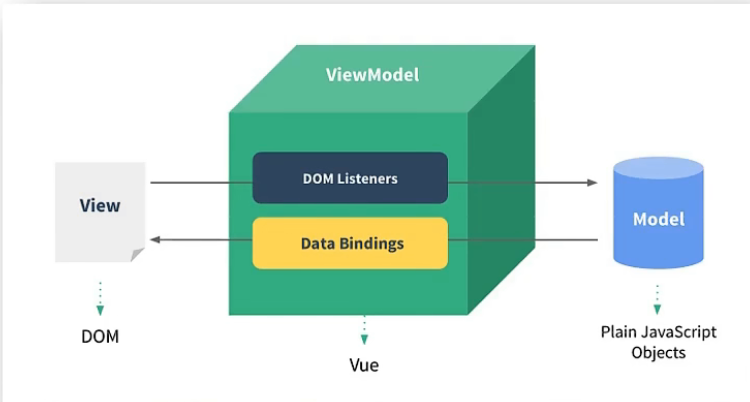
总结:
- Vue构造函数 所管理的 data 函数中所有的属性,最终都会出现在 vm 实例身上
- vm 身上的所有属性 以及 Vue 原型上的所有属性,在 Vue 模板语法中均可以直接使用
数据代理
Object.defineProperty()
1 | /* |
实现简单数据代理
单向绑定
1 | let obj1 = { x:1 } |
事件处理
事件的基本使用
- 使用
v-on:xxx或 语法糖形式:@xxx绑定事件,其中xxx是事件名,如:<button @click="show(value)">点击输出信息</button> - 事件的回调需要配置在 methods 对象中,最终会在 vm 上
- methods 中配置的函数,都是被 Vue 所管理的函数,事件处理函数中的 this 的指向 vm 或 组件实例对象
@click="show(value)"和@click="show"效果一致,事件处理函数会默认收到事件信息,如果同时需要事件信息和传递形参,需借助$event,例如:<button @click="show($event,value)">点击输出信息</button>1
2
3
4
5
6
7
8
9
10
11
12
13
14
15
16
17
18
19
20
21
22
23
24
25
26
27
28
29
30
31
32<div id="root">
<h2>事件处理</h2>
<hr>
<!-- <button v-on:click="show">点击输出信息</button> -->
<!-- 语法糖 -->
<button @click="show">点击输出信息</button>
<!-- 传参 -->
<button @click="show1(66)">点击输出信息2</button>
<!-- 传参 并且需要 event 对象 -->
<button @click="show2($event,44)">点击输出信息3</button>
</div>
<script type="text/javascript">
Vue.config.productionTip = false
const vm = new Vue({
el: '#root',
data: {
name:'Hello'
},
methods: {
show(event) {//默认接收到事件信息
console.log(event.target);
console.log(this.name); // Hello
},
show1(value) {
console.log(value); // 66
},
show2(event,value) {
console.log(event,value); // 'event' , 44
}
}
})
</script>
事件修饰符
Vue中的事件修饰符
- .prevent:阻止默认事件(常用) 原生 —— event.preventDefault()
- .stop:阻止事件冒泡(常用) 原生 —— event.stopPropagation()
- .once:事件只触发一次(常用)
- .capture: 使用事件捕获模式(即内部元素触发的事件先在此处理,然后才交由内部元素进行处理)
- .self: 只当在 event.target 是当前元素自身时触发处理函数
- .passive: 事件默认行为立即执行,无需等待事件回调执行完毕
1
2<!-- 修饰符可以串联 -->
<a @click.stop.prevent="doThat"></a>
键盘事件
键盘事件语法糖:@keydown,@keyup
- Vue中常用的按键别名:
- 回车 => enter
- 删除 => delete
- 退出 => esc
- 空格 => space
- 换行 => tab (特殊,必须配合keydown去使用)
- 上 => up
- 下 => down
- 左 => left
- 右 => right
- Vue未提供别名的按键,可以使用按键原始的key值去绑定,但注意要转为kebab-case(短横线命名)
- 系统修饰键(用法特殊):ctrl、alt、shift、meta
(1). 配合keyup使用:按下修饰键的同时,再按下其他键,随后释放其他键,事件才被触发。
(2). 配合keydown使用:正常触发事件。 - 也可以使用keyCode去指定具体的按键(不推荐)
- Vue.config.keyCodes.自定义键名 = 键码,可以去定制按键别名(不推荐)
1
2
3
4
5
6
7
8
9
10
11
12
13
14
15
16
17
18<div id="root">
<h2>键盘事件</h2>
<hr>
<input type="text" @keyup.enter="showInfo" placeholder="回车确认">
<input type="text" @keyup.enter="showInfo" placeholder="回车确认">
<input type="text" @keyup.ctrl.y="showInfo" placeholder="ctrl+y确认">
</div>
<script type="text/javascript">
Vue.config.productionTip = false
const vm = new Vue({
el: '#root',
methods: {
showInfo(event) {
console.log(event.target.value);
}
}
})
</script>
computed
- 在 computed 属性对象中定义计算属性的方法
- 在页面中使用来显示计算的结果
- 定义:要用的属性不存在,要通过已有属性计算得来。
- 原理:底层借助了
Objcet.defineproperty方法提供的 getter 和 setter。 - 计算属性的 get 函数什么时候执行?
(1). 初次读取时会执行一次。
(2). 当依赖的数据发生改变时会被再次调用。 - 优势:与 methods 实现相比,内部有缓存机制(复用),效率更高,调试方便。
- 备注:
(1). 计算属性最终会出现在vm上,直接读取使用即可。
(2). 如果计算属性要被修改,那必须写set 函数去响应修改,且 set 中要引起计算时依赖的数据发生改变。计算属性的简写方式:(前提:此计算属性不需要被修改)1
2
3
4
5
6
7
8
9
10
11
12
13
14
15
16
17
18
19
20
21
22
23
24
25
26
27
28
29<div id="root">
<h2>计算属性案例</h2>
<hr>
<input type="text" v-model="firstname">
<input type="text" v-model="lastname">
<h4>{{fullName}}</h4>
</div>
<script type="text/javascript">
Vue.config.productionTip = false
const vm = new Vue({
el: '#root',
data:{
firstname:'张',
lastname:'三'
},
computed: {
fullName: {
get() {
return this.firstname + `-`+ this.lastname
},
set(value) {
const arr = value.split('-')
this.firstname = arr[0]
this.lastname = arr[1]
}
}
}
})
</script>1
2
3
4
5
6computed: {
// 可以将计算属性写为一个函数形式,此函数当作计算属性的 getter 使用
fullName() {
return this.firstname + `-`+ this.lastname
}
}
watch
通过 vm 对象的 $watch() 或 watch 配置来监听指定的属性
当被监听的属性变化时, 回调函数自动调用, 进行相关操作
监听的属性必须存在,才能进行监听!!!
监听的两种写法:
(1). new Vue时传入watch配置
(2). 通过vm.$watch监听
1 | <script type="text/javascript"> |
1 | <script type="text/javascript"> |
深度监听
适用与监听引用数据类型
- Vue 中的 watch 默认不监测对象内部值的改变(一层)。
- 配置
deep:true可以监测对象内部值改变(多层),个人理解为监听引用数据类型
备注: - Vue 自身可以监测对象内部值的改变,但 Vue 提供的 watch 默认不可以!
- 使用 watch 时根据数据的具体结构,决定是否采用深度监听。
1
2
3
4
5
6
7
8
9
10
11
12
13
14
15
16
17
18
19data:{
obj:{
a:0,
b:1
}
},
watch:{
// 监听多级结构中的某个属性
'obj.a':{
handler(newValue,oldVlaue){console.log(newValue,oldVlaue);
}
},
// 监听多级结构
obj:{
deep:true,//开启深度监听
handler(newValue,oldVlaue){console.log(newValue,oldVlaue);
}
}
}
监听属性的简写形式
1 | watch:{ |
computed 和 watch 的区别
- computed 能完成的功能,watch 都可以完成。
- watch 能完成的功能,computed 不一定能完成,例如:watch 可以进行异步操作,computed 中不能开启异步任务。
- 两个重要的小原则:
- 所有被 Vue管理的函数,最好写成普通函数,这样 this 的指向才是 vm 或 组件实例对象。
- 所有不被 Vue所管理的函数(定时器的回调函数、ajax 的回调函数等、Promise 的回调函数),最好写成箭头函数,这样this 的指向才是 vm 或 组件实例对象。
1
2
3
4
5
6
7
8
9
10
11
12
13
14
15
16
17
18
19
20// 错误示例
const vm = new Vue({
el: '#root',
data:{
a:1,
b:2
},
computed: {
sum() {
setTimeout(()=>{
reuturn a + b
// return的值交给箭头函数执行 ,箭头函数由浏览器定时器对象调用,非 Vue 示例调用
},1000)
}
}
})
/*
计算属性必须要返回值,侦听属性是依靠给已有属性重新赋值。
异步任务不能使用 return 给外部同步函数返回值,因为是异步的,所以也不能用同步定义的变量接
*/
动态指定class & style 样式
在应用界面中, 某个(些)元素的样式是变化的,class/style 绑定就是专门用来实现动态样式效果的技术
- class绑定:
:class='xxx' // xxx可以是字符串、对象、数组。
字符串 表达式是字符串:'classA'适用于:类名不确定,要动态获取
对象 表达式是对象:{classA:isA, classB: isB}适用于:要绑定多个样式,个数不确定,名字也不确定
数组 表达式是数组:['classA', 'classB']适用于:要绑定多个样式,个数确定,名字也确定,但不确定用不用 - style 绑定:
:style="{ color: activeColor, fontSize: fontSize + 'px' }",其中 activeColor/fontSize 是 data 属性
对象:style="{fontSize: xxx}"其中xxx是动态值。
数组:style="[a,b]"其中a、b是样式对象。1
2
3
4
5
6
7
8
9
10
11
12
13
14
15
16
17
18
19
20
21
22
23
24
25
26
27
28
29
30
31
32
33
34
35
36
37
38
39
40
41
42
43
44
45
46
47<div id="root">
<h2>动态指定样式</h2>
<hr>
<!-- 绑定样式 —— 字符串写法 适用情况:样式类名不确定 需要追加-->
<h3 class="basic red" :class="login_class">未登录/注册</h3>
<button @click="login">登录</button>
<button @click="demo">随机改变样式</button>
<!-- 绑定样式 —— 数组写法 适用情况:样式类名不确定 追加个数也不确定-->
<h3 :class="class_arr">未登录/注册</h3>
<!-- 绑定样式 —— 对象写法 适用情况:样式类名确定 个数确定 但动态决定追加-->
<h3 :class="class_obj">未登录/注册</h3>
<!-- 绑定内联样式 —— 对象写法 -->
<!-- <h3 :style="{fontSize: 10+'px'}"> 内联样式指定 </h3> -->
<h3 :style="style_obj"> 内联样式对象指定 </h3>
<!-- 绑定内联样式 —— 数组写法 (极少用)-->
<h3 :style="[style_obj]"> 内联样式数组指定 </h3>
</div>
<script type="text/javascript">
Vue.config.productionTip = false
const vm = new Vue({
el: '#root',
data:{
login_class:'12',
class_arr:['pink','green'],
class_obj:{
pink:true,
green:false
},
style_obj:{
fontSize: '10px'
}
},
methods: {
login() {
this.login_class = 'green'
},
demo() {
let arr = ['red','green','pink']
this.login_class = arr[Math.floor(Math.random()*3)]
},
}
})
</script>
渲染指令
v-if | v-show
- v-if
语法:
v-if = '表达式'v-else-if = '表达式'v-else = '表达式'
适用于:切换频率较低的场景
特点:不展示的DOM元素直接被移除
注意:v-if可以和:v-else-if、v-else一起使用,但要求结构不能被“打断”
- v-show
语法:
v-show='表达式'
适用于:切换频率较高的场景
特点:不展示的DOM元素未被移除,仅仅是使用样式隐藏掉(display:none)
备注:使用 v-if 的时,元素可能无法获取到,而使用v-show一定可以获取到 v-if 是实打实地改变dom元素,v-show 是隐藏或显示dom元素1
2
3
4
5
6
7
8
9
10
11
12
13
14
15
16
17
18
19
20
21
22
23
24
25
26
27
28
29
30
31
32
33<div id="root">
<h2>条件渲染</h2>
<hr>
<!-- v-show 可以接受布尔值/表达式作为属性值 -->
<div v-show="true">{{ hello_name }}</div>
<div v-show="0.1+0.2===0.3">{{ vue_name }}</div>
<!-- v-if 可以接受布尔值/表达式作为属性值 -->
<div v-if="n==1">{{ hello_name }}</div>
<div v-else-if="n==2">{{ hello_name }}!</div>
<div v-else-if="n==3">{{ hello_name }}!!</div>
<div v-else-if="n>=3">{{ hello_name }} good</div>
<button @click="n++">点击变换</button>
<!-- v-if与template的配合使用 管理多个元素渲染 -->
<template v-if="n==1">
<ul>
<li>1</li>
<li>2</li>
<li>3</li>
</ul>
</template>
</div>
<script type="text/javascript">
const x= new Vue({
el:'#root',
data:{
hello_name:'Vue',
vue_name:'Vue',
n:1
}
})
</script>
列表渲染 | v-for
v-for指令,用于展示列表数据
语法:v-for="(item, index) in xxx" :key="yyy"
可遍历元素:数组、对象、字符串(用的很少)、指定次数(用的很少)
- 组: (item, index)
- 象: (value, key)
- 符串:(char, index)
- 字:(number, index)
1
2
3
4
5
6
7
8
9
10
11
12
13
14
15
16
17
18
19
20
21
22
23
24
25
26
27
28
29
30
31
32
33
34
35
36
37
38<div id="root">
<h2>列表渲染</h2>
<hr>
<div>
<!-- 遍历数组 -->
<!-- <ul v-for="p in persion" :key="p.id"> -->
<ul v-for="p of persion" :key="p.id">
<li>{{p.name}} ,年龄:{{p.age}}</li>
</ul>
<!-- 遍历对象 -->
<ul v-for="(value,key) of persion[0]" :key="key">
<li>{{ value }}</li>
</ul>
<!-- 遍历字符串 -->
<ul v-for="(char,index) of 'hello'" :key="index">
<li>第{{index}}字母为:{{ char }}</li>
</ul>
<!-- 遍历指定次数 -->
<ul v-for="(char,index) of 4" :key="char+index+Math.random()">
<li>{{ char }} ,索引为 {{index}}</li>
</ul>
</div>
</div>
<script type="text/javascript">
const x= new Vue({
el:'#root',
data:{
persion: [
{id:'sk9G2O01avD',name:'张三',age:'12'},
{id:'k8F4Dl7m',name:'李四',age:'34'},
{id:'oB5vA0Qmm1p',name:'杰克',age:'22'}
]
}
})
</script>
key 的作用与原理
虚拟DOM中key的作用:
key是虚拟DOM对象的标识,当数据发生变化时,Vue会根据【新数据】生成【新的虚拟DOM】, 随后Vue进行【新虚拟DOM】与【旧虚拟DOM】的差异比较,比较规则如下:
对比规则:
- 旧虚拟DOM中找到了与新虚拟DOM相同的key:
①若虚拟DOM中内容没变, 直接使用之前的真实DOM
②若虚拟DOM中内容变了, 则生成新的真实DOM,随后替换掉页面中之前的真实DOM - 旧虚拟DOM中未找到与新虚拟DOM相同的key创建新的真实DOM,随后渲染到到页面。
用index作为key可能会引发的问题:
- 若对数据进行:逆序添加、逆序删除等破坏顺序操作: 会产生没有必要的真实DOM更新 ==> 界面效果没问题, 但效率低
- 如果结构中还包含输入类的DOM: 会产生错误DOM更新 ==>界面有问题
开发中如何选择key:
- 最好使用每条数据的唯一标识作为key, 比如id、手机号、身份证号、学号等唯一值。
- 如果不存在对数据的逆序添加、逆序删除等破坏顺序操作,仅用于渲染列表用于展示,使用index作为key是没有问题的。
实现列表排序
1 | <div id="root"> |
数据监测原理_对象
简单模拟vue更新数据原理
1 | let data = { |
Vue.set
对象中后追加的属性,Vue 默认不做响应式处理,Vue.set() 方法可以给对象添加属性,并触发视图更新。
Vue.set 的使用(两种方式)
方式1:Vue.set(target,propertyName/index,value)
方式2:vm.$set(target,propertyName/index,value)
注意:Vue.set方法也可以对数组(数组是特殊的对象)进行操作,但是不能对data中的根数据进行改变
1 | <div id="root"> |
数据监测原理_数组
vue 监测在数组中没有 getter 和 setter,所以监测不到数据的更改,也不会引起页面的更新。
vue 对数组的监测是通过 包装数组上常用的用于修改数组的方法来实现的。
1 | <div id="root"> |
总结:
Vue监听数据的原理:
- vue会监听data中所有层次的数据
- 如何监测对象中的数据?
通过 setter 实现监听,且要在 new Vue 时就传入要监测的数据。
对象中后追加的属性,Vue 默认不做响应式处理,如需给后添加的属性做响应式,请使用如下API:1
2Vue.set(target,propertyName/index,value)
vm.$set(target,propertyName/index,value) - 如何监测数组中的数据?
通过包裹数组更新元素的方法实现,本质就是做了两件事:- 调用原生对应的方法对数组进行更新
- 重新解析模板,进而更新页面
- 在Vue修改数组中的某个元素一定要用如下方法:
使用这些API:push()、pop()、shift()、unshift()、splice()、sort()、reverse()
Vue.set()或vm.$set()
直接替换原数组 如:arr = arr.filter((n)=>{return n!==1}) - 特别注意:
Vue.set()和vm.$set()不能给 vm 或 vm 的根数据对象 添加属性!!! - 数据劫持:每个数据经过数据代理的过程就叫数据劫持
收集表单数据
- v-model 默认收集的是被收集元素的 value 值,用户输入即收集 value 值。如 text/password/email等属性input表单元素
<input type="text" v-model="userInfo.account"> - 表单元素默认无 value 值的,如 checkbox/redio/select等属性表单元素,可以手动配置value属性,v-model收集配置属性
<input type="radio" name="sex" v-model="userInfo.sex" value="male"> - 没有配置 value 属性的表单元素,那么默认收集的就是 checked(勾选 or 未勾选,是布尔值)
<input type="checkbox" v-model="userInfo.agree"> - v-model 的指定收集元素的初始值会影响 收集的属性配置了 input 的 value 属性
v-model 的初始值是非数组,那么收集的就是 checked(勾选 or 未勾选,是布尔值)
v-model 的初始值是数组,那么收集的的就是 手动配置的 value 组成的数组 - v-model 收集表单元素可以添加修饰符,如
v-model.number = 'userInfo.age'
lazy:失去焦点再收集数据
number:输入字符串转为有效的数字
trim:输入首尾空格过滤1
2
3
4
5
6
7
8
9
10
11
12
13
14
15
16
17
18
19
20
21
22
23
24
25
26
27
28
29
30
31
32
33
34
35
36
37
38
39
40
41
42
43
44<div id="root">
<form action="">
账号:<input type="text" v-model="userInfo.account"><br><br>
密码:<input type="text" v-model="userInfo.password"><br><br>
性别:
男 <input type="radio" name="sex" v-model="userInfo.sex" value="male">
女 <input type="radio" name="sex" v-model="userInfo.sex" value="female"><br><br>
爱好:
LOL <input type="checkbox" v-model="userInfo.hobby" value="lol">
原神 <input type="checkbox" v-model="userInfo.hobby" value="mihoyo"><br><br>
所在服务器:
<select name="" id="" v-model="userInfo.server">
<option value="">请选择你的服务器地址</option>
<option value=" asia ">亚洲</option>
<option value=" america ">美洲</option>
<option value=" europe ">欧洲</option>
</select><br><br>
其它信息:
<textarea name="" id="" v-model="userInfo.other"></textarea><br><br>
<input type="checkbox" v-model="userInfo.agree"> 阅读并接收<a href="#">用户协议</a><br><br>
<button type="button" @click="login">登录</button>
</form>
</div>
<script type="text/javascript">
const x= new Vue({
el:'#root',
data:{
userInfo:{
account:'',
password:'',
sex:'',
hobby:[],
server:'',
other:'',
agree:'',
}
},
methods: {
login() {
console.log(JSON.stringify(this.userInfo));
}
},
})
</script>
过滤器(了解)
定义:对要显示的数据进行特定格式化后再显示(适用于一些简单逻辑的处理)。
语法:
- 注册过滤器:
全局注册Vue.filter(name,callback)
局部注册new Vue{filters:{}} - 使用过滤器:
{{ xxx | 过滤器名}}或v-bind:属性 = 'xxx | 过滤器名'
备注:
- 过滤器也可以接收额外参数、多个过滤器也可以串联
- 过滤器并没有改变原本的数据, 是产生新的对应的数据
1
2
3
4
5
6
7
8
9
10
11
12
13
14
15
16
17
18
19<div id="root">
<h2>过滤器</h2>
<hr>
<h3 v-if="timeStr">当前时间为: {{ time | timeFormater }}</h3>
</div>
<script type="text/javascript">
let time = new Date()
const vm = new Vue({
el:'#root',
data:{
time
},
filters:{
timeFormater(value) {
return value.toLocaleString()
}
}
})
</script>
vue指令
内置指令
目前vue中的常见内置指令:
- v-bind : 单项绑定解析表达式 ,语法糖: :xxx
- v-model : 双向数据绑定
- v-on : 绑定事件监听 语法糖: @
- v-if : 条件渲染(动态控制节点是否存在)
- v-else : 条件渲染(动态控制节点是否存在)
- v-show : 条件渲染(动态控制节点是否展示)
- v-for : 遍历数组/对象/字符串
- v-text : 向所在节点渲染指定文本内容
- v-html : 向所在节点渲染指定标签内容
- v-cloak : 向所在节点渲染指定文本内容
- v-once : 向所在节点渲染指定文本内容
- v-pre : 向所在节点渲染指定文本内容
1
2
3
4
5
6
7
8
9
10
11
12
13
14
15
16
17
18
19
20
21
22
23
24
25
26
27
28<div id="root">
<!-- v-text 解析文本-->
<div v-text="name">你好,</div>
<!-- v-html 解析标签-->
<div v-html="aStr"></div>
<!-- v-cloak 添加爹play:none属性,vue实例接管容器之后会删除此属性-->
<h3 v-cloak> hello {{name}} </h3>
<!-- v-once 添加此属性的标签只会在初始动态渲染后,转为为静态属性-->
<div v-once> number初始值为 {{ number }} </div>
<div>number值为 {{ number }} </div>
<button @click="number++">number++</button>
<!-- v-pre 添加此属性,vue实例解析模板时会跳过解析阶段 一般用于优化-->
<div v-pre> number值为 {{ number }} </div>
</div>
<script type="text/javascript">
const vm = new Vue({
el:'#root',
data:{
name: 'Vue',
number:1,
aStr: `<a href="javascript:alert('XSS攻击成功');">链接标签</a>`
}
})
</script>
自定义指令
局部指令语法
1 | new Vue({ |
配置对象 directives 中常用的3个回调:
- bind:指令与元素成功绑定时调用。
- inserted:指令所在元素被插入页面时调用。
- update:指令所在模板结构被重新解析时调用。
全局指令的定义方式:Vue.directive('指令名',{}) 或者Vue.directive('指令名',function() {})
注意:
- 自定义指令名不要采用驼峰命名法,因采用以下的方式
big-number() {},调用方式<div v-bing-number="number"></div> - 指令定义时不使用 v- ,使用时需要添加 v-
理解这三个的调用时机,需要进一步了解 vue 的生命周期。
实例:1
2
3
4
5
6
7
8
9
10
11
12
13
14
15
16
17
18
19
20
21
22
23
24
25
26
27
28
29
30
31
32
33<div id="root">
<h2>自定义指令</h2>
<hr>
<button @click="number++">n++</button>
<div v-bing="number"></div>
<div v-fbnd="number"></div>
</div>
<script type="text/javascript">
const vm = new Vue({
el:'#root',
data:{
name: 'Vue',
number:1
},
directives:{
bing:{
bind(element,binding){
console.log(element,binding);
element.innerText = binding.value*100
},// 指令所在元素 与 Vue实例绑定时 调用
inserted(element, binding){
element.style.background = 'skyblue'
},// 指令所在元素被插入页面时 调用
update(element, binding){
element.innerText = binding.value*100
}// 指令所在的模板被重新解析时 调用
},
fbnd(element, binding){
element.innerText = binding.value
}
}
})
</script>
Vue生命周期
Vue 实例有⼀个完整的⽣命周期:new Vue()、初始化事件(.once事件)和生命周期、编译模版、挂载Dom -> 渲染、更新 -> 渲染、卸载 等⼀系列过程,称这是Vue的⽣命周期。生命周期函数中的 this 指定 vm 或者组件实例对象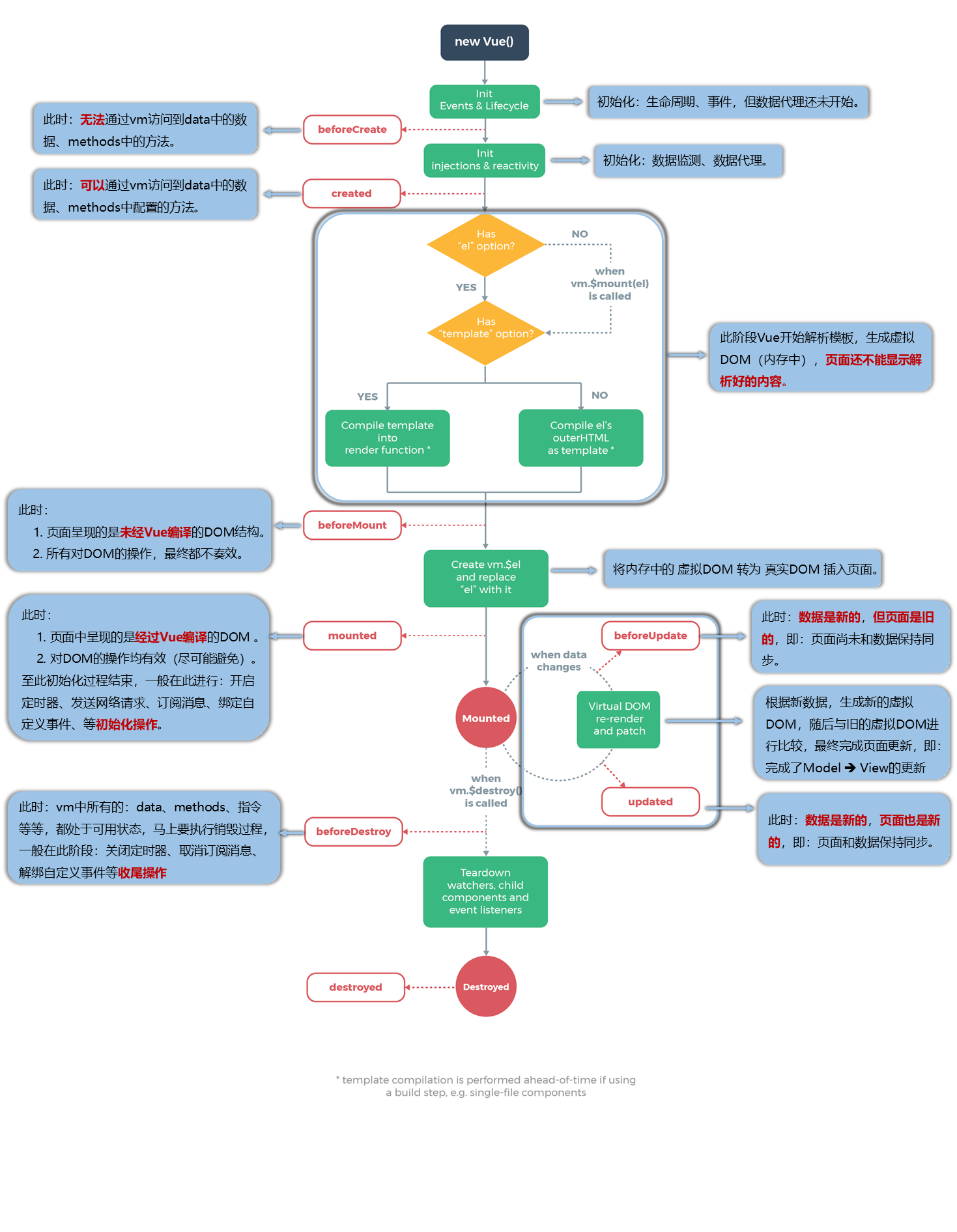
- beforeCreate(创建前):数据监测(getter和setter)和初始化事件还未开始,此时 data 的响应式追踪、event/watcher 都还没有被设置,也就是说不能访问到data、computed、watch、methods上的方法和数据。
- created(创建后):实例创建完成,实例上配置的 options 包括 data、computed、watch、methods 等都配置完成,但是此时渲染得节点还未挂载到 DOM,所以不能访问到 $el属性。
- beforeMount(挂载前):在挂载开始之前被调用,相关的render函数首次被调用。此阶段Vue开始解析模板,生成虚拟DOM存在内存中,还没有把虚拟DOM转换成真实DOM,插入页面中。所以网页不能显示解析好的内容。
- mounted(挂载后,常用):在el被新创建的 vm.$el(就是真实DOM的拷贝)替换,并挂载到实例上去之后调用(将内存中的虚拟DOM转为真实DOM,真实DOM插入页面)。此时页面中呈现的是经过Vue编译的DOM,这时在这个钩子函数中对DOM的操作可以有效,但要尽量避免。一般在这个阶段进行: 开启定时器,发送网络请求,订阅消息,绑定自定义事件 等
- beforeUpdate(更新前):响应式数据更新时调用,此时虽然响应式数据更新了,但是对应的真实 DOM 还没有被渲染(数据是新的,但页面是旧的,页面和数据没保持同步呢)。
- updated(更新后) :在由于数据更改导致的虚拟DOM重新渲染和打补丁之后调用。此时 DOM 已经根据响应式数据的变化更新了。调用时,组件 DOM已经更新,所以可以执行依赖于DOM的操作。然而在大多数情况下,应该避免在此期间更改状态,因为这可能会导致更新无限循环。该钩子在服务器端渲染期间不被调用。
- beforeDestroy(销毁前,常用):实例销毁之前调用。这一步,实例仍然完全可用,this 仍能获取到实例。在这个阶段一般进行: 关闭定时器,取消订阅消息,解绑自定义事件 等。
- destroyed(销毁后):实例销毁后调用,调用后,Vue 实例指示的所有东西都会解绑定,所有的事件监听器会被移除,所有的子实例也会被销毁。该钩子在服务端渲染期间不被调用。
父子组件生命周期顺序:
创建阶段:父组件beforeCreate -> 父组件created -> 父组件beforeMount -> 子组件beforeCreate -> 子组件created -> 子组件beforeMount -> 子组件mounted -> 父组件mounted更新阶段:父组件beforeUpdate -> 子组件beforeUpdate -> 子组件updated -> 父组件updated销毁阶段:父组件beforeDestroy -> 子组件beforeDestroy -> 子组件destroyed -> 父组件destroyed
组件化
Vue中使用组一个文件的三大步骤:
- 定义组件(创建组件)
- 注册组件
- 使用组件(写组件标签)
了解组件化开发
单文件组件和非单文件组件
单文件组件:一个文件只包含一个组件(推荐)
非单文件组件:一个文件包含n个组件
组件化基本过程
- 创建组件
- 注册组件
- 使用组件
1
2
3
4
5
6
7
8
9
10
11
12
13
14
15
16
17
18
19
20
21
22
23
24
25
26
27
28
29
30
31
32
33
34
35
36
37
38
39
40
41
42<div id="root">
<!-- 3. 使用组件 -->
<tit></tit>
<hr>
<div >{{number}}</div>
<hello></hello>
</div>
<script type="text/javascript">
// 1. 利用 Vue.extend() 创建组件
const tit = Vue.extend({
data() {
return {
con:"组件化基本流程(局部注册)"
}
},
template:`
<>
<h3>{{con}}</h3>
</>
`
})
const hel = Vue.extend({
template:`
<>
<h3>hello world !!!</h3>
</>
`
})
// 3.全局注册 要在创建 vm 实例之前注册
Vue.component('hello',hel)
const vm = new Vue({
el:'#root',
data:{
number:1
},
// 2. 注册组件
components:{
tit
}
})
</script>
组件注意点
关于组件名:
一个单词组成:
第一种写法(首字母小写):tit,使用组件:
第二种写法(首字母大写):Tit ,使用组件:
多个单词组成:
第一种写法(kebab-case命名):my-school,使用组件:
第二种写法(CamelCase命名):MySchool (需要Vue脚手架支持),使用组件:
备注:
(1).组件命名规则之一:不要使用 HTML 中已有的元素名称,例如:h2、H2都不行。
(2).可以使用 name 配置项指定组件在开发者工具中呈现的名字。如:
1 | const tit = Vue.extend({ |
关于组件标签:
第一种写法:
第二种写法:
备注:不用使用脚手架时,会导致后续组件不能渲染。
一个语法糖:const school = Vue.extend(options) 可简写为:const school = options
1 | const tit = { |
组件嵌套
1 | <div id="root"> |
VueComponetn
- 各组件本质是一个名为 VueComponent 的构造函数,且不是程序员定义的,是 Vue.extend 生成的。
- 我们只需要写组件标签,Vue解析时会帮我们创建组件的实例对象,即Vue帮我们执行的:new VueComponent(options)。
- 特别注意:每次调用Vue.extend,返回的都是一个 全新的 VueComponent (这个VueComponent可不是实例对象)
- 关于this指向:
组件配置中:
- data函数、methods中的函数、watch中的函数、
- computed中的函数 它们的this均是【VueComponent实例对象】。
- new Vue(options)配置中:
- data函数、methods中的函数、watch中的函数、computed中的函数 它们的this均是【Vue实例对象】。
- VueComponent的实例对象,以后简称vc(也可称之为:组件实例对象)。Vue的实例对象,以后简称vm。
Vue与VueComponent
一个重要的内置关系:VueComponent.prototype.proto === Vue.prototype
为什么要有这个关系:让组件实例对象(vc)可以访问到 Vue原型上的属性、方法。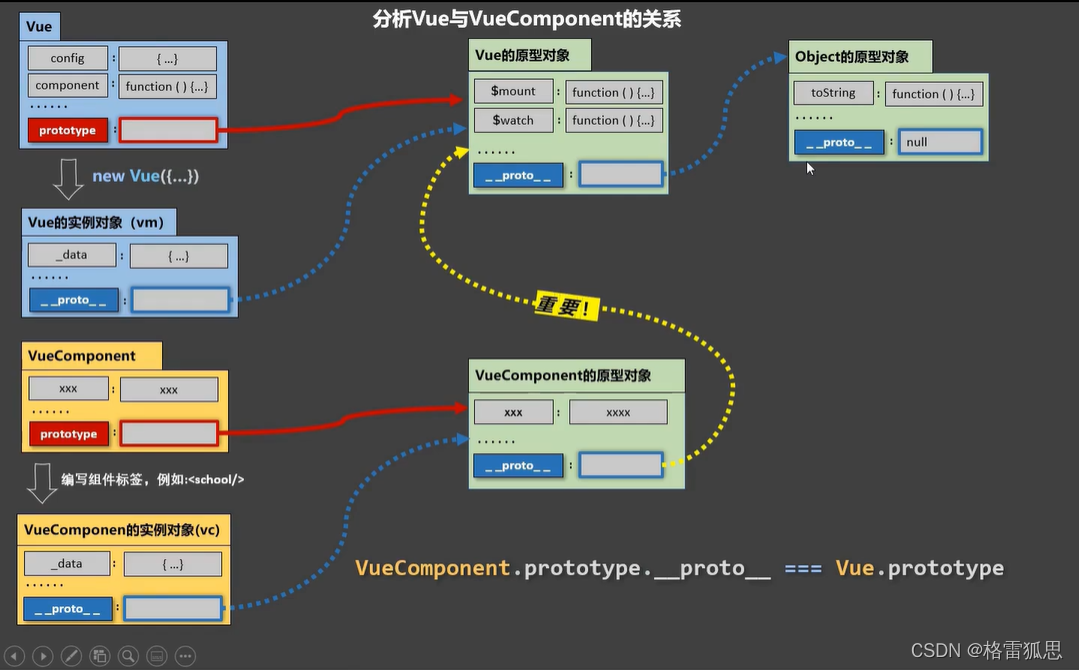
单文件组件文件结构
单文件组件需要借助脚手架环境
main.js 入口文件
1 | import App from "./App.vue"; |
App.vue 根组件
1 | <template> |
School.vue 组件
1 | <template> |
index.html
1 | <body> |
脚手架基础
基本使用
安装npm install -g @vue/cli
创建项目vue create 项目名
运行项目npm run serve
脚手架文件目录
1 | ├── node_modules |
render函数
vue.js与vue.runtime.xxx.js的区别:
vue.js是完整版的Vue,包含:核心功能+模板解析器。
vue.runtime.xxx.js是运行版的Vue,只包含:核心功能;没有模板解析器。
默认使用 vue.runtime.xxx.js ,没有模板解析器,所以不能使用template配置项,需要使用render函数接收到的createElement函数去指定具体内容。
1 | import Vue from 'vue' |
配置文件
使用vue inspect > output.js命令可以查看到 脚手架隐藏的 webpack 配置,会生成查看文件 output.js 文件。
手动配置 webpack ,使用 文件 vue.config.js vue.config.js 配置参考
ref 属性
ref 被用来给元素或子组件注册引用信息(id的替代者)
应用在html标签上获取的是真实DOM元素,应用在组件标签上是组件实例对象(vc)
使用方式:
标识:<h1 ref="xxx">.....</h1>或 <School ref="xxx"></School>
获取:this.$refs.xxx
1 | <template> |
props 属性传参
功能:让组件接收外部传过来的数据
传递参数:
接收参数:
第一种方式(只接收):props:[‘name’]
第二种方式(限制类型):props:{name:String}
第三种方式(限制类型、限制必要性、指定默认值):
1 | export default { |
备注:props是只读的,Vue底层会监测你对props的修改,如果进行了修改,就会发出警告,若业务需求确实需要修改,那么请复制props的内容到data中一份,然后去修改data中的数据。
mixin 混入
混入 (mixin) 提供了一种非常灵活的方式,来分发 Vue 组件中的可复用功能(配置)。
一个混入对象可以包含任意组件选项。当组件使用混入对象时,所有混入对象的选项将被“混合”进入该组件本身的选项。
当组件和混入对象含有同名选项时,这些选项将以恰当的方式进行“合并”。如,数据对象在内部会进行递归合并,并在发生冲突时以组件数据优先。
- 定义混入文件 mixin.jsschool.vue
1
2
3
4
5
6
7
8
9
10
11
12
13
14
15
16
17
18
19
20
21
22
23
24
25
26
27
28
29
30
31
32
33
34
35
36
37
38
39
40export const show = {
methods:{
showName(){
console.log(this.name);
}
}
}
export const stu = {
data() {
return {
students:[
{id:'01',name:'lisi',age:18},
{id:'02',name:'wangwu',age:28},
{id:'03',name:'tom',age:23},
{id:'04',name:'jerry',age:22}
]
}
},
}
```
2. 使用混入(局部混入)
student.vue
```html
<template>
<div>
<ul>
<li v-for="stu in students" :key="stu.id">
姓名:{{stu.name}},年龄:{{stu.age}}
</li>
</ul>
</div>
</template>
<script>
import { stu } from "../minxin";
export default {
name:"Student",
mixins:[stu]
}
</script>1
2
3
4
5
6
7
8
9
10
11
12
13
14
15
16
17
18
19<template>
<div class="school" @click="showName">
名字:{{name}},地址:{{address}}
</div>
</template>
<script>
import { show } from '../minxin.js'
export default {
name:'School',
data(){
return {
name:"xxx学校",
address:"china",
}
},
mixins:[show]
}
</script - 全局混入
main.js1
2
3
4
5
6
7
8
9
10
11
12
13import Vue from 'vue'
import App from "./App.vue";
// 引入混入文件
import { show,Stu } from "./minxin";
// 合并混入
Vue.mixin(show)
Vue.mixin(Stu)
new Vue({
el:'#app',
render:n=>n(App)
})
插件
插件通常用来为 Vue 添加全局功能。插件的功能范围没有严格的限制。
本质:包含 install 方法的一个对象,install的第一个参数是Vue,第二个以后的参数是插件使用者传递的数据。
语法: 对象.install = function (Vue, options) {}
常被用来定义以下配置
- 添加全局过滤器 Vue.filter(….)
- 添加全局指令 Vue.directive(….)
- 配置全局混入(合) Vue.mixin(….)
- 添加实例方法(添加后 vm vc均可调用)Vue.prototype.key = value
示例:通过全局方法1
2
3
4
5
6
7
8
9
10
11
12
13
14
15
16
17
18
19
20
21
22
23
24
25
26
27
28
29
30
31
32
33
34
35
36
37export default {
install(Vue) {
//全局过滤器
Vue.filter('mySlice', function (value) {
return value.slice(0, 4)
})
//定义全局指令
Vue.directive('fbind', {
//指令与元素成功绑定时(一上来)
bind(element, binding) {
element.value = binding.value
},
//指令所在元素被插入页面时
inserted(element, binding) {
element.focus()
},
//指令所在的模板被重新解析时
update(element, binding) {
element.value = binding.value
}
})
//定义混入
Vue.mixin({
data() {
return {
x: 100,
y: 200
}
},
})
//给Vue原型上添加一个方法(vm和vc就都能用了)
Vue.prototype.hello = () => { alert('你好啊aaaa') }
}
}Vue.use()使用插件。它需要在调用 new Vue() 启动应用之前完成:1
2
3
4
5
6// 调用 `MyPlugin.install(Vue)`
Vue.use(MyPlugin)
new Vue({
// ...组件选项
})
scoped 样式作用域
作用:让样式在局部生效,防止冲突。
写法:<style lang='css' scoped> ... </style>或<style lang='less' scoped> ... </style>
补充:使用 less 安装npm install less less-loader
ToDolist案例
- 组件化编码流程:
(1).拆分静态组件:组件要按照功能点拆分,命名不要与html元素冲突。
(2).实现动态组件:考虑好数据的存放位置,数据是一个组件在用,还是一些组件在用:
1).一个组件在用:放在组件自身即可。
2). 一些组件在用:放在他们共同的父组件上(状态提升)。
(3).实现交互:从绑定事件开始。 - props适用于:
(1).父组件 ==> 子组件 通信
(2).子组件 ==> 父组件 通信(要求父先给子一个函数) - 使用v-model时要切记:v-model绑定的值不能是props传过来的值,因为props是不可以修改的!
- props传过来的若是对象类型的值,修改对象中的属性时Vue不会报错,但不推荐这样做。
本地存储
Cookie
- Cookie是最早被提出来的本地存储方式,在此之前,服务端是无法判断网络中的两个请求是否是同一用户发起的,为解决这个问题,Cookie就出现了。Cookie 是存储在用户浏览器中的一段不超过 4 KB 的字符串。它由一个名称(Name)、一个值(Value)和其它几个用 于控制 Cookie 有效期、安全性、使用范围的可选属性组成。不同域名下的 Cookie 各自独立,每当客户端发起请求时,会自动把当前域名下所有未过期的 Cookie 一同发送到服务器。
- Cookie的特性:
- Cookie一旦创建成功,名称就无法修改
- Cookie是无法跨域名的,也就是说a域名和b域名下的cookie是无法共享的,这也是由Cookie的隐私安全性决定的,这样就能够阻止非法获取其他网站的Cookie
- 每个域名下Cookie的数量不能超过20个,每个Cookie的大小不能超过4kb
- 有安全问题,如果Cookie被拦截了,那就可获得session的所有信息,即使加密也于事无补,无需知道cookie的意义,只要转发cookie就能达到目的
- Cookie在请求一个新的页面的时候都会被发送过去
- Cookie 在身份认证中的作用
客户端第一次请求服务器的时候,服务器通过响应头的形式,向客户端发送一个身份认证的 Cookie,客户端会自动 将 Cookie 保存在浏览器中
随后,当客户端浏览器每次请求服务器的时候,浏览器会自动将身份认证相关的 Cookie,通过请求头的形式发送给 服务器,服务器即可验明客户端的身份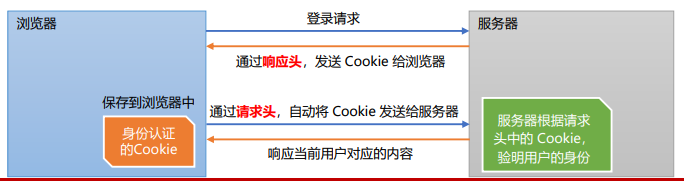
cookie 的基本语法和使用方式:
设置 Cookie
1 | // 服务器端设置 |
1 | // 设置 |
Cookie 不能直接删除,可以通过:覆盖 Cookie、设置过期时间、使用 HttpOnly 和 Secure 属性禁用
Cookie 可以通过 Domain 和 Path 来跨子域共享,但不能跨完全不同的域
LocalStorage 和 SessionStorage 完全局限于同一域和协议,不能共享数据给不同的域或子域
常用属性
- name:Cookie 的名称
- value:Cookie 的值
- SameSite:限制跨站请求时发送 Cookie,用于防止 CSRF 攻击
- Secure:如果设置了 Secure,cookie 只会在 HTTPS 连接时被发送
- HttpOnly:cookie 无法通过 JavaScript 访问,有助于防止 XSS 攻击
- Domain:指定 cookie 适用的域。默认是当前域,设置这个属性可以让 cookie 在子域共享
- Max-Age:设置 cookie 的存活时间,以秒为单位。与 expires 类似,但更推荐使用 Max-Age
- Expires:过期时间,格式通常为 GMT 格式。如果未指定,将在会话结束时(浏览器关闭时)删除
- Path: 设置 cookie 适用的路径。例如,path=/ 表示 cookie 对整个网站可用,而 path=/somepath/ 表示 cookie 仅对 /somepath/ 下的路径有效
读取 Cookie
1 | var cookies = document.cookie |
删除 Cookie
将过期时间设为过去的时间可以删除 Cookie:
1 | document.cookie = "username=; expires=Thu, 01 Jan 1970 00:00:00 GMT; path=/" |
webStorage
LocalStorage
- LocalStorage是HTML5新引入的特性,由于有的时候我们存储的信息较大,Cookie就不能满足我们的需求,这时候LocalStorage就派上用场了。
- LocalStorage的优点:
在大小方面,LocalStorage的大小一般为5MB,可以储存更多的信息
LocalStorage是持久储存,并不会随着页面的关闭而消失,除非主动清理,不然会永久存在
仅储存在本地,不像Cookie那样每次HTTP请求都会被携带 - LocalStorage的缺点:
存在浏览器兼容问题,IE8以下版本的浏览器不支持
如果浏览器设置为隐私模式,那我们将无法读取到LocalStorage
LocalStorage受到同源策略的限制,即端口、协议、主机地址有任何一个不相同,都不会访问SessionStorage1
2
3
4
5
6
7
8
9
10
11
12
13
14
15localStorage 常用 API
// 保存数据到 localStorage
localStorage.setItem('key', 'value');
// 从 localStorage 获取数据
let data = localStorage.getItem('key');
// 从 localStorage 删除保存的数据
localStorage.removeItem('key');
// 从 localStorage 删除所有保存的数据
localStorage.clear();
// 获取某个索引的Key
localStorage.key(index) - Session是另一种记录客户状态的机制,不同的是Cookie保存在客户端浏览器中,而Session保存在服务器上。客户端浏览器访问服务器的时候,服务器把客户端信息以某种形式记录在服务器上。这就是Session。客户端浏览器再次访问时只需要从该Session中查找该客户的状态就可以了,session是一种特殊的cookie。cookie是保存在客户端的,而session是保存在服务端。
- 为什么要用 session
由于cookie 是存在用户端,而且它本身存储的尺寸大小也有限,最关键是用户可以是可见的,并可以随意的修改,很不安全。那如何又要安全,又可以方便的全局读取信息呢?于是,这个时候,一种新的存储会话机制:session 诞生了
具体应用参考:前后端的身份认证 - session原理
当客户端第一次请求服务器的时候,服务器生成一份session保存在服务端,将该数据(session)的id以cookie的形式传递给客户端;以后的每次请求,浏览器都会自动的携带cookie来访问服务器(session数据id)。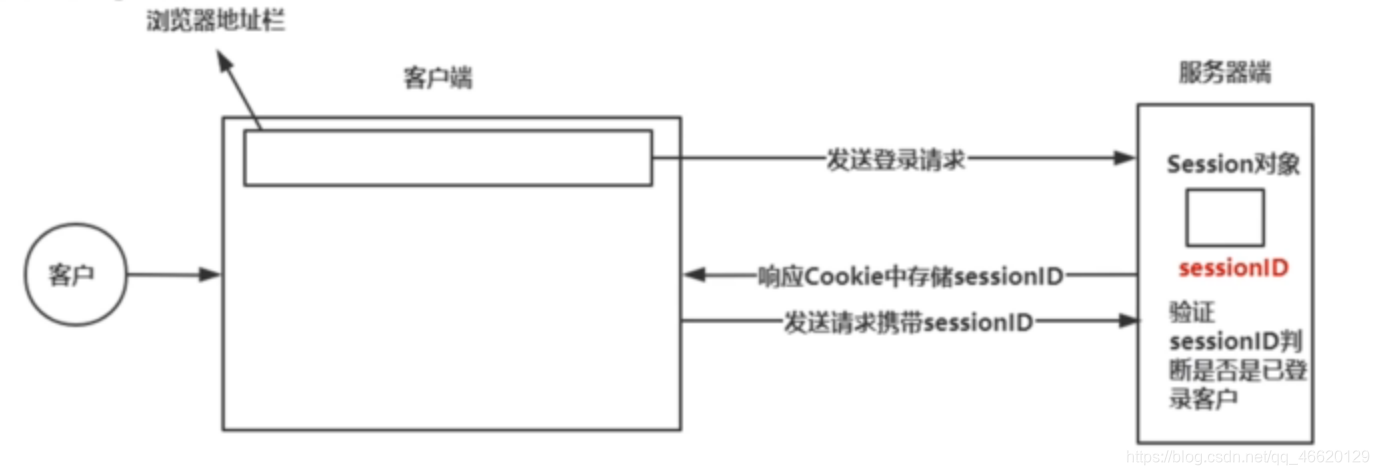
session 工作流程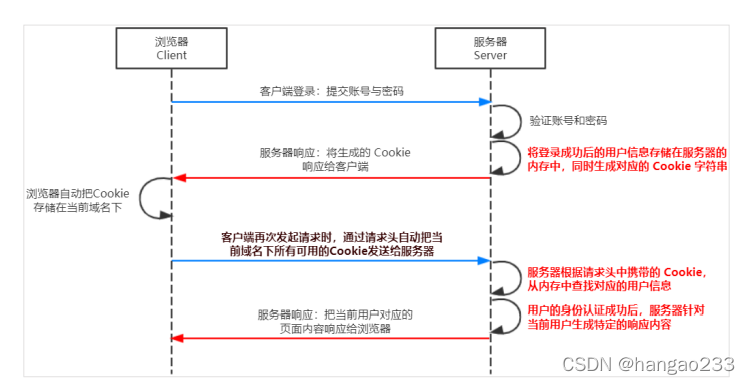
自定义事件
组件自定义事件是一种组件间通信的方式,适用于:子组件 ===> 父组件(那么就要在父组件中给子组件绑定自定义事件(事件的回调在A中))
- 绑定自定义事件:
第一种方式:(利用 v-on 绑定,利用this.$emit('name',value)触发)
父组件
1 | <!-- 利用自定义事件 传递回调实现数据传递 --> |
子组件
1 | <button @click="sendStudent">传递学生</button> |
第二种方式,(利用 this.$refs.Stu.$on('antguigu',this.getStudentName) 绑定,利用 this.$emit('name',value) 触发)
父组件
1 | <!-- 利用自定义事件 传递回调实现数据传递 --> |
子组件
1 | <button @click="sendStudent">传递学生</button> |
- 解绑自定义事件
语法:
this.$off()不传参,解绑所有事件this.$off('antguigu')传递字符串参数,解绑指定单个事件this.$off(['antguigu','demo'])传递字符串数组参数,解绑指定多个事件
父组件
1 | export default { |
子组件
1 | <script> |
- 组件上也可以绑定原生DOM事件,需要使用 native 修饰符。
<Student ref="student" @click.native="show"/> - 注意:通过
this.$refs.xxx.$on('atguigu',回调)绑定自定义事件时,回调要么配置在methods中,要么用箭头函数,否则this指向会出问题!
全局事件总线
一种组件间通信的方式,适用于任意组件间通信。
- 安装全局事件总线:
1
2
3
4
5
6
7
8// main.js
new Vue({
......
beforeCreate() {
Vue.prototype.$bus = this //安装全局事件总线,$bus就是当前应用的vm
},
......
}) - 使用事件总线:
- 接收数据:A组件想接收数据,则在A组件中给$bus绑定自定义事件,事件的回调留在A组件自身。
1
2
3
4
5
6
7methods(){
demo(data){......}
}
// ......
mounted() {
this.$bus.$on('xxxx',this.demo)
} - 提供数据:
this.$bus.$emit('xxxx',数据)
- 注意:最好在beforeDestroy钩子中,用$off去解绑当前组件所用到的事件。
全局事件总线实现: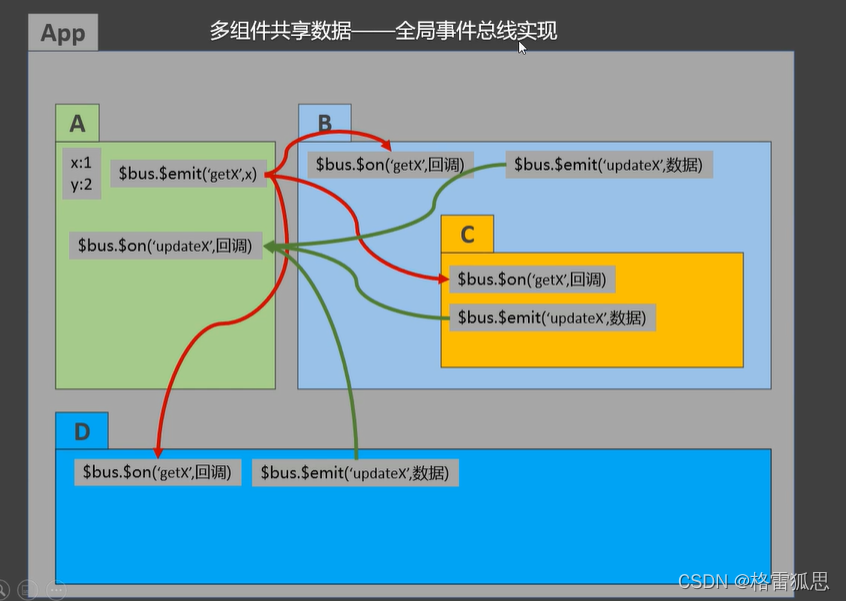
消息订阅与发布
Vue中了解,常用事件总线
一种组件间通信的方式,适用于任意组件间通信
使用步骤:
安装 第三方库:npm i pubsub-js
引入: import pubsub from 'pubsub-js'
接收数据:A组件想接收数据,则在A组件中订阅消息,订阅的回调留在A组件自身
1 | methods:{ |
提供数据:pubsub.publish(‘xxx’,数据)
最好在beforeDestroy钩子中,用PubSub.unsubscribe(pid)去取消订阅。
$nextTick
语法:this.$nextTick(回调函数)
作用:在下一次 DOM 更新结束后执行其指定的回调。
什么时候用:当改变数据后,要基于更新后的新DOM进行某些操作时,要在nextTick所指定的回调函数中执行。
1 | this.$nextTick(function(){ |
动画与过度
作用:在插入、更新或移除 DOM元素时,在合适的时候给元素添加样式类名。
过渡
写法:
- 准备以下样式:
元素进入的样式:
- v-enter:进入的起点
- v-enter-active:进入过程中
- v-enter-to:进入的终点
元素离开的样式: - v-leave:离开的起点
- v-leave-active:离开过程中
- v-leave-to:离开的终点
- 使用
包裹要过渡的元素,并配置name属性: 备注:若有多个元素需要过度,则需要使用:1
2
3<transition name="hello">
<h1 v-show="isShow">你好啊!</h1>
</transition>,且每个元素都要指定key值。
1 | <div > |
动画
1 | <button @click="isShow=!isShow">显示/隐藏</button> |
动画第三方库
Animate.css
安装:npm install animate.css --save
引入:import 'animate.css'
使用:
1 | name="animate__animated animate__bounce" |
1 | <template> |
插槽
作用:让父组件可以向子组件指定位置插入html结构,也是一种组件间通信的方式,适用于 父组件 ===> 子组件 。
分类:默认插槽、具名插槽、作用域插槽
默认插槽
1 | 父组件中: |
具名插槽
1 | 父组件中: |
作用域插槽
props: 父给子传数据,传方法
作用域插槽:数据在组件的自身(子组件),但根据数据生成的结构需要组件的使用者(父组件)来决定。
1 | 父组件中: |
网络请求
目前可以发送网络请求的方式:
- xhr(基于XMLHttpRequest) 存在的问题:配置调用混乱;编码方式复杂;实际开发中经常被JQuery-Ajax代替
- JQuery-Ajax 存在的问题:Vue开发中不需要调用jQuery这个重量级框架(1w+行)
- vue-resource(vue1.x推出) vue2.0之后不在更新和维护,作者推荐了axios
- fetch 基于promis 但兼容性差
axios发送网络请求
axios特点
- 在浏览器中发送 XMLHttpRquest 请求
- 在 node.js 中发送http请求
- 支持 Promise API
- 拦截(转换)请求和响应
- 转换请求和响应
axios基本使用:
- 安装:npm install axios –save
- 引入:import axios from “axios”
- 使用(默认使用get请求):
1
2
3
4
5
6
7
8
9
10
11
12
13
14
15
16
17
18
19
20
21
22
23// 请求方法 1
axios ({
url: 'http://127.0.0.1:3001/data',
// params 可选 针对get请求的参数拼接 如:127.0.0.1:3000/data?type=pop
params: {
type: "pop",
page: 1
}
}).then(res => {
console.log(res);
})
// 简化方法
axios.get('url').then(
// 成功的回调
response => {
console.log(response.data);
}
// 失败的回调
error => {
console.log(error.message);
}
)
跨域问题
报错,违反了同源策略(协议、域名和端口相同,可访问资源)
1 | Access to XMLHttpRequest at 'https://www.runoob.com/try/ajax/json_demo.json' from origin 'http://localhost:8080' has been blocked by CORS policy: No 'Access-Control-Allow-Origin' header is present on the requested resource. |
解决跨域问题
- cros (后端使用)
- jsonp (面试题,但实际应用少)
- 代理服务器
服务器之间使用http协议传输数据,不受同源策略限制,前端正向代理后端反向代理
缺点:会导致请求和服务器都不知道来自哪里
方式1:借助vue cli开启单个代理服务器,在vue.config.js中添加如下配置:
官方配置参考文档:
说明:
优点:配置简单,请求资源时直接发给 8080 端口即可。
缺点:不能配置多个代理,不能灵活的控制请求是否走代理。
工作方式:若按照上述配置代理,当请求了前端 (public) 不存在的资源时,那么该请求会转发给服务器 (优先匹配前端资源)
1 | // 配置代理服务器 |
方式2:
可以配置多个代理,且可以灵活控制是否请求代理;缺点 配置较为繁琐,请求资源必须加前缀
1 | // 配置代理服务器 |
VueX
- 概念
在Vue中实现集中式状态(数据)管理的一个Vue插件,对vue应用中多个组件的共享状态进行集中式的管理(读/写),也是一种组件间通信的方式,且适用于任意组件间通信。 - 何时使用?
多个组件需要共享数据时 - 原理
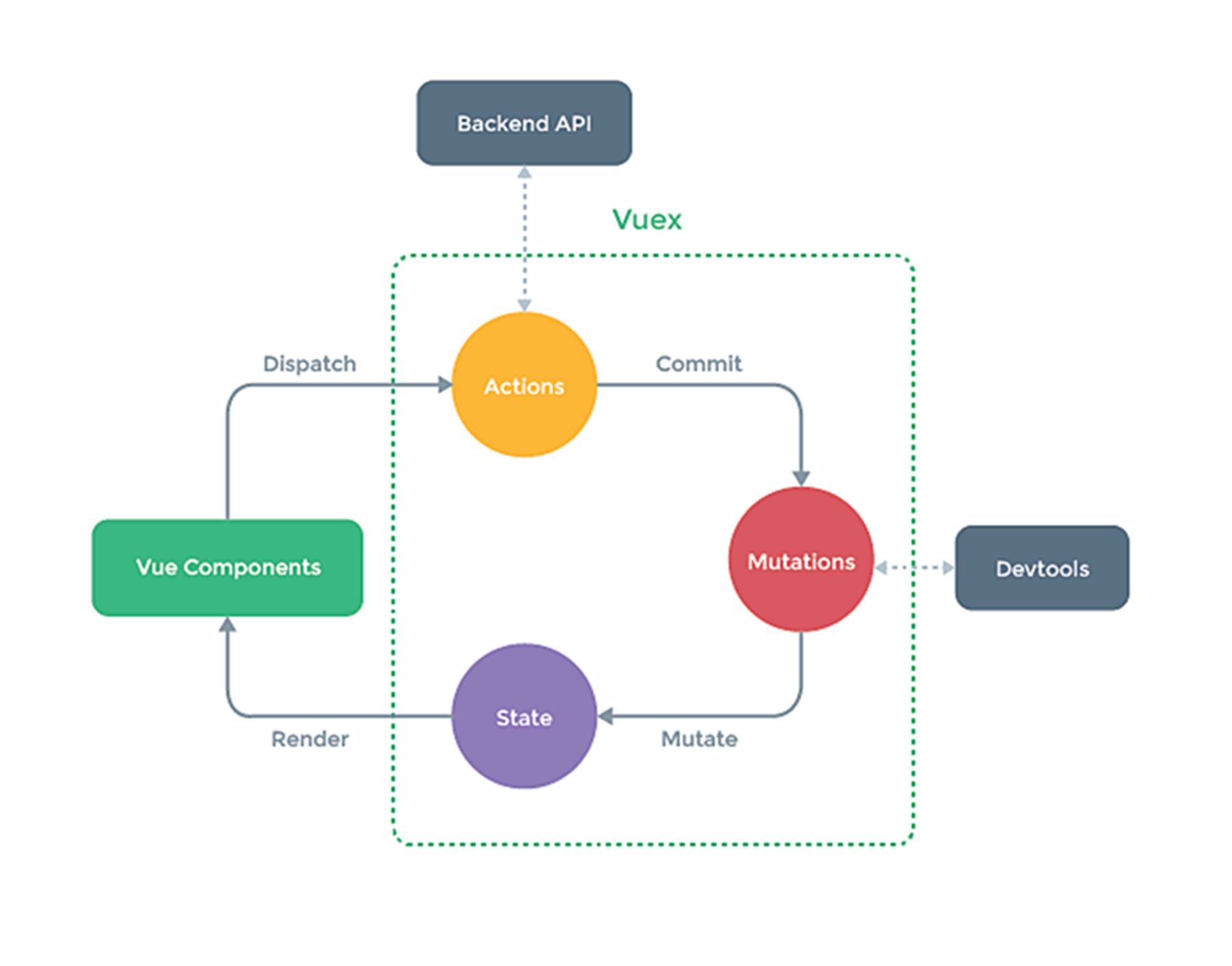
1. 搭建vuex 环境
- 创建文件:src/store/index.js
1
2
3
4
5
6
7
8
9
10
11
12
13
14
15
16
17
18
19
20
21// 创建store
import Vue from "vue";
// 引入vuex
import Vuex,{ Store } from "vuex"
// 使用插件
Vue.use(Vuex)
// 准备actions对象——响应组件中用户的动作
const actions = {}
// mutations -- 处理组件操作
const mutations = {}
// state -- 存储数据
const state = {}
// 暴露store
export default new Store({
actions,
mutations,
state
}) - 在main.js中创建vm时传入store配置项
1
2
3
4
5
6
7
8
9
10
11......
//引入store
import store from './store'
......
//创建vm
new Vue({
el:'#app',
render: h => h(App),
store
})
vuex基本使用
初始化数据、配置actions、配置mutations,操作文件store.js
1 |
|
- 组件中读取vuex中的数据:
$store.state.sum - 组件中修改vuex中的数据:
$store.dispatch('action中的方法名',数据)或$store.commit(‘mutations中的方法名’,数据) - 备注:若没有网络请求或其他业务逻辑,组件中也可以越过actions,即不写dispatch,直接编写commit
1
2
3
4
5
6
7
8
9
10
11
12
13
14
15
16
17
18
19
20
21
22
23
24
25
26
27
28
29
30
31
32
33
34
35
36
37
38
39
40
41
42<template>
<div>
<h3>当前求和结果为: {{$store.state.sum}}</h3>
<div>
<select name="" id="" v-model.number="inputNumber">
<option value="1">1</option>
<option value="2">2</option>
<option value="3">3</option>
</select>
<button @click="increment">+</button>
<button @click="decrement">-</button>
<button @click="incrementOdd">结果为奇数再加</button>
<button @click="incrementAsync">异步+</button>
</div>
</div>
</template>
<script>
export default {
name:"Category",
data() {
return {
inputNumber: 1
}
},
methods: {
increment() {
this.$store.commit('INCREMENT',this.inputNumber)
},
decrement() {
this.$store.commit('DECREMENT',this.inputNumber)
},
incrementOdd() {
this.$store.dispatch('incrementOdd',this.inputNumber)
},
incrementAsync () {
this.$store.dispatch('incrementAsync',this.inputNumber)
}
},
}
</script>
getters
概念:当state中的数据需要经过加工后再使用时,可以使用getters加工。
在store.js中追加getters配置
1 | import Vue from "vue"; |
组件中读取数据:$store.getters.bigSum
1 | <template> |
vuex 中的四个 map 方法
- mapState 映射 state 中的数据为计算属性
1
2
3
4
5
6
7
8
9
10
11
12
13// store.js
const state = {
school: 'xxx',
sum: 0,
}
//组件计算属性
computed: {
// 借助 mapState 生成计算属性:sum、school(对象写法)
...mapState({sum:'sum',school:'school'}),
// 借助 mapState 生成计算属性:sum、school(数组写法)
...mapState(['sum','school']),
} - mapGetters 映射 getters 中的数据为计算属性
1
2
3
4
5
6
7
8
9
10
11
12
13
14// store.js
const getters = {
bigSum(state) {
return state.sum>0?state.sum*(state.sum-1):state.sum
}
}
//组件计算属性
computed: {
// 借助 mapGetters 生成计算属性:bigSum(对象写法)
...mapGetters({bigSum:'bigSum'}),
// 借助 mapGetters 生成计算属性:bigSum(数组写法)
...mapGetters(['bigSum']),
} - mapActions与mapMutations
帮助我们生成与actions对话的方法,即:包含$store.dispatch(xxx)的函数1
2
3
4
5
6
7
8
9
10
11
12
13
14
15
16
17
18
19
20
21
22methods: {
// increment() {
// this.$store.commit('INCREMENT',this.inputNumber)
// },
// decrement() {
// this.$store.commit('DECREMENT',this.inputNumber)
// },
//语法糖:靠 mapActions生成:increment、decrement(对象形式)
...mapMutations({increment:'increment',decrement:'decrement'}),
...mapMutations(['increment','decrement']),
// incrementOdd() {
// this.$store.dispatch('incrementOdd',this.inputNumber)
// },
// incrementAsync () {
// this.$store.dispatch('incrementAsync',this.inputNumber)
// }
//语法糖:靠 mapActions 生成:incrementOdd、incrementAsync两种方式
...mapActions({incrementOdd:'incrementOdd',incrementAsync:'incrementAsync'})
...mapActions(['incrementOdd','incrementAsync'])
}
vuex 模块化
目的:让代码更好维护,让多种数据分类更加明确。
store.js
1 | // countAbout personAbout 可以封装为文件并单独引入 |
读取 state 数据
1 | //方式一:自己直接读取 |
读取 getters 数据
1 | //方式一:自己直接读取 |
组件中调用 commit
1 | //方式一:自己直接 commit |
组件中调用 dispath
1 | //方式一:自己直接 dispath |
示例:
1 | // 创建store |
1 | // main.js |
1 | // Counter.vue |
1 | // Peersion.vue |
路由
一个路由(route)就是一组映射关系(key - value),多个路由需要路由器(router)进行管理。
前端路由:key是路径,value是组件。后端路由:key是路径,value是函数/方法。
vue-router
vue-router是一个插件库,用于实现SPA 单页面应用
安装vue-router,命令:npm i vue-router
应用插件:
1 | import Vue from 'vue' |
编写router配置项:
1 | //引入 VueRouter |
配置路由路径(active-class可配置高亮样式)<router-link active-class="active" to="/about"> About </router-link>
指定展示位置<router-view></router-view>
注意点:
- 路由组件通常存放在pages文件夹,一般组件通常存放在components文件夹。
- 通过切换,“隐藏”了的路由组件,默认是被销毁掉的,需要的时候再去挂载。
- 每个组件都有自己的$route属性,里面存储着自己的路由信息。
- 整个应用只有一个router,可以通过组件的$router属性获取到。
嵌套路由
配置路由规则,使用children配置项:
1 | // router/index.js |
跳转(要写完整路径):<router-link to="/home/news">News</router-link>
指定展示位置<router-view></router-view>
路由传参 query参数
1 | <!-- 传参方式1 (字符串) --> |
接收参数<li> {{$route.query.id}} {{$route.query.title}} </li>
补充:路由的命名
作用:可以简化路由的跳转。
1 | // 配置路由表时添加 name |
使用时
1 | <!--简化前,需要写完整的路径 --> |
路由传参 路由的params参数
1 | { |
传递参数
1 | <!-- 字符串形式 --> |
接收参数<li> {{$route.params.id}} {{$route.params.title}} </li>
路由的 props 配置
作用:让路由组件更方便的收到参数
1 | { |
使用props:['id','title']
router-link 的replace属性
作用:控制路由跳转时操作浏览器历史记录的模式
浏览器的历史记录有两种写入方式:分别为push和replace,push是追加历史记录,replace是替换当前记录。路由跳转时候默认为push
如何开启replace模式:<router-link replace .......>News</router-link>
编程式路由导航
作用:不借助
1 | //$router的两个API |
缓存路由组件
作用:让不展示的路由组件保持挂载,不被销毁。
具体编码:
1 | <!-- <keep-alive include="News,Message"> --> |
路由组件生命周期
作用:路由组件所独有的两个钩子,用于捕获路由组件的激活状态。
具体名字:
- activated路由组件被激活时触发。
- deactivated路由组件失活时触发。
这两个生命周期钩子需要配合前面的缓存路由组件使用(没有缓存路由组件不起效果)
路由守卫
作用:对路由进行权限控制
分类:全局守卫、独享守卫、组件内守卫
全局前置守卫
1 | //全局前置守卫:初始化时执行、每次路由切换前执行 |
全局后置守卫
1 | //全局后置守卫:初始化时执行、每次路由切换后执行 |
独享路由守卫
配置路由时,在具体路由中
1 | const router = new VueRouter({ |
组件内守卫
在路由组件中编写,类似于组件生命周期
1 | //进入守卫:通过路由规则,进入该路由组件时被调用 |
路由器的两种工作模式
1 | const router = new VueRouter({ |
对于一个url来说,什么是 hash值?—— #及其后面的内容就是hash值。
hash值不会包含在 HTTP 请求中,即:hash值不会带给服务器。
- hash模式:
地址中永远带着#号,不美观 。
若以后将地址通过第三方手机app分享,若app校验严格,则地址会被标记为不合法。
兼容性较好。 - history模式:
地址干净,美观 。
兼容性和hash模式相比略差。
应用部署上线时需要后端人员支持,解决刷新页面服务端404的问题。